Bybit Pro can create limit TPs for your orders.
Will only work if Bybit Pro is up and running on the account and instrument you're trading at the moment your order is filled and network conditions are optimal
Limit TPs are placed as Good Till Cancel to avoid being cancelled by the post only mechanism, make sure to have 0.05% minimum on the first TP to mitigate eventual taker fees.
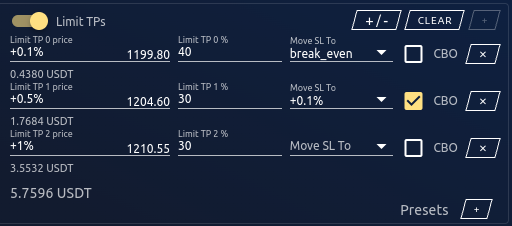
¶ Limit TP mode
Limit TPs can operate in two modes, you can change it in settings :
- Order mode :
Bybit Pro will place limit TP(s) for each filled order based on order price, regardless of the position entry price. This can lead to some negative PnLs at first but average TP will be positive when all TPs are reached.
- Position mode :
Bybit Pro will place limit TP(s) based on your position entry and replace them if/when more orders are filled.
¶ Adding a limit TP
When first opening Bybit Pro, there is only one row in limit TPs where you can put any smart input value.
In order to add a new limit TP, you must first reduce the % of the first. Total percentages can't go over 100%. Once you have done that, the + button at the top will be enabled and you will be able to add a new one.
¶ Limit TP presets
Limit TP presets can save the current values in the form for later use.
Click on the + button to save them, and click on the number to reload values in the form.
Right-click on a preset to delete it.
¶ Move SL To
Places a stop loss when TP is filled
¶ CBO/CSO
Cancel remaining buy/sell orders when TP is filled